
How To Do A Website Audit: Step-By-Step
A website audit is a full check-up for your site. It looks at what’s happening behind the scenes (SEO and tech stuff), how your content’s performing, and how real people experience your site.
The goal? To spot what’s slowing you down, hurting visibility, or leaking conversions.
Your website might look fine…but is it doing its job? An audit lets you review how your site is performing across SEO, user experience, content, and tech. It shows you what’s working, what’s broken, and helps you pinpoint issues that are holding you back.
But let’s face it, the word “audit” is daunting. If you’re wondering how to do a website audit, I’ll break it down in this guide. Plus, you get a free checklist that will keep you on track and empower you to take action.
So, let’s get straight into it.
I’m Short On Time…What Are the Main Takeaways?
If you only have two minutes, here is the "cheat sheet" for auditing your website and why it matters for your business growth.
1. The "Why"
An audit is a full health check for your site. It ensures you aren't just "getting traffic," but actually turning that traffic into revenue. 88% of users won't return after a bad experience—don't let your site be that statistic.
2. The Frequency
Standard: Once every quarter (4x per year).
High Performance/eCommerce: Once a month.
Always: After a major site update or a Google Algorithm change.
3. The 5 Pillars of a Perfect Audit
SEO: Are you ranking for the right keywords?
Technical: Is your site fast, secure (HTTPS), and mobile-friendly?
Content: Is your information up-to-date and offering real value (E-E-A-T)?
UX & Conversion: Can a user find what they need and "buy" within 3 seconds?
Backlinks: Who is vouching for your site's authority?
4. The "Starter Pack" Tools
You don't need a massive budget to start. Use these free industry standards:
Google Search Console (Performance & Indexing)
Screaming Frog (Technical Errors & Broken Links)
Google PageSpeed Insights (Speed & Core Web Vitals)
WAVE (Accessibility & Contrast)
5. The Golden Rule
Prioritise fixes by impact. A slow-loading site or a "Manual Action" penalty from Google is a much bigger deal than a minor design tweak. Fix the "foundation" first, then worry about the "decorations."
Download Your Free Site Audit Checklist
Grab a 100% free website audit checklist and simplify the process. This checklist takes you through each stage of an audit, including must-dos, key areas to focus on, and next steps.
Just click the button below, fill in your email, and I’ll send the link straight to your inbox. Unsubscribe at any time.
How Often Should You Audit Your Website?
Website audits don’t just help you isolate “something’s wrong” moments; they also help you prevent future problems, before your rankings, revenue, or credibility take a hit.
Small business owners should perform a complete website audit at least once a quarter. But, if your website has experienced previous problems or you sell eCommerce products, I recommend a full site audit once a month.
Download the free website audit checklist so you can follow along (and not miss a thing).
What Is a Website Audit and Why Do I Need One?
Website audits are basically full health checks for your site. They look at its visibility, performance, content quality, and conversions. Think of it like an MOT.
You might think your website is primed for leads, conversions, and sales, but even minor issues could limit its performance.
Proper website audits have multiple layers, including:
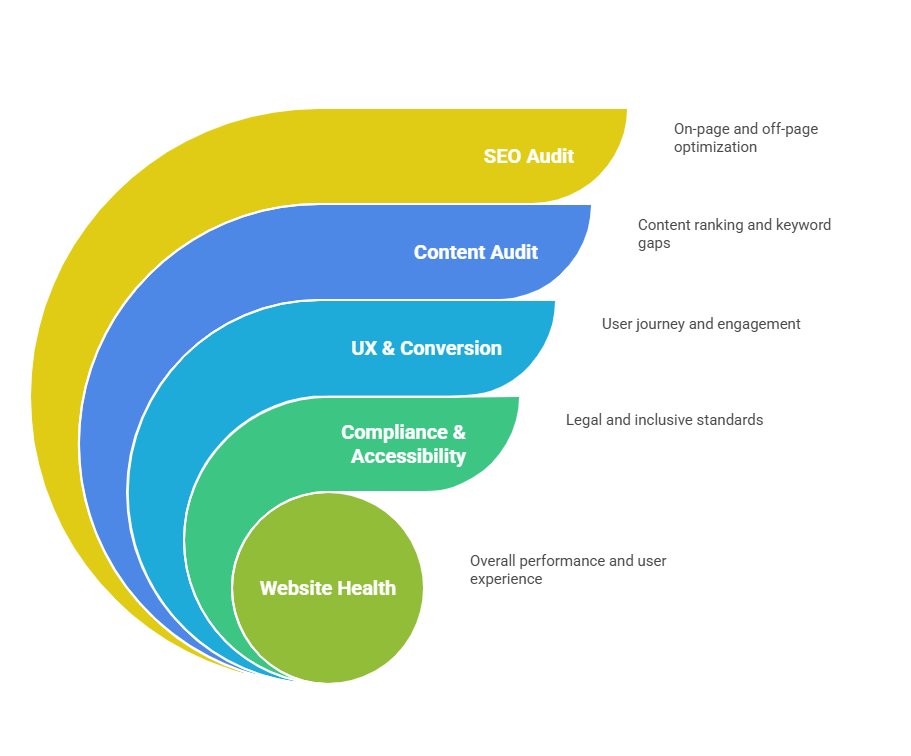
SEO Audit: Assessing your site’s on-page and off-page health. These audits include checking rankings, viewing on-page performance, and monitoring your backlink profile.
Technical SEO Audit: The behind-the-scenes stuff that often slips through the net. Mobile responsiveness, loading speed, broken links, and other technical errors could limit your website’s ability to rank.
Content Audit: Check whether your content is ranking, spot keyword gaps, and measure your content performance against competitors.
UX & Conversion Audit: Identifying the user journey, including friction points, drop-offs, website navigation, and testing CTAs.
Compliance & Accessibility Review: Ensuring your website complies with GDPR and that it is accessible to everyone.
When these work together, your site becomes easier to find, use, and trust.
The benefits of running a website audit
As a small business, you’re probably well aware of the competition. Larger brands seem to outrank you, and it feels like a never-ending struggle to achieve the visibility you deserve.
Website audits are essential for all websites, but they become especially valuable for small businesses. Research shows that 20% of small businesses fail in the first year because they can’t keep up with the competition (Capsule CRM).
Once you know what’s holding you back, you can make sure your website does its job.
Better Search Visibility
The simplest way to attract website traffic? Show up at the right time. When people are actively searching for your products or services, your website should be the solution.
Unfortunately, achieving search visibility is one of the biggest challenges small businesses face. But with the right SEO strategy, you can increase your organic presence.
Cleaner User Experience
Even if you’re attracting website traffic, that doesn’t mean that your visitors will become loyal customers. User experience is one of the most important factors in attracting conversions.
Research shows that 88% of people won’t return to a website if it delivers a poor UX. So, even if you think your website looks great, a UX audit might tell a very different story.
Higher Conversion Rates
Every website depends on conversions. Whether you want people to download a free resource, fill in an enquiry form, or make a purchase, your content, SEO, technical elements, and UX can all make a difference.
When your website performs to its maximum ability, there are fewer barriers to conversion.
Remove Technical Issues
It’s easy to forget about technical SEO issues, because they’re not visible. But, responsiveness, loading speed, broken links, and other technical problems all play key roles in your website’s performance.
Comprehensive audits let you isolate technical issues that are preventing your site from ranking. Google makes it clear that page experience is a core ranking factor.
Clear Priorities
Website audits also provide a clear breakdown of what’s going on and where your priorities should be. Instead of random fixes, you can focus on the most critical fixes first, then work your way down the list.
For example, if your website's loading speed is impacting UX, that’s a more important fix than tweaking a minor design element.
How many times should you audit your website for SEO?
A full SEO audit should take place 2-4 times a year, with regular light check-ins after major updates, migrations, content pushes, and algorithm changes.
Preparing For Your Website Audit
So, now you know what website audits are and why they’re essential, it’s time to learn how to do them.
Below is a step-by-step website audit process to help you stay on track, identify core issues, and implement fixes.
Step 1: Crawl Your Site
SEO audit tools crawl your website exactly how search engines like Google and Bing would. It’s the first step in your audit: the crawl assesses each page and generates a report with recommended fixes.
My top recommendation for website crawls is Screaming Frog. The tool is free for websites with up to 500 URLs, and it lets you identify important issues that require fixes, including duplicate URLs and broken links.
As you can see from this crawl, the tool has clearly identified several vital fixes. Your main priorities here should be the issues and warnings tabs.
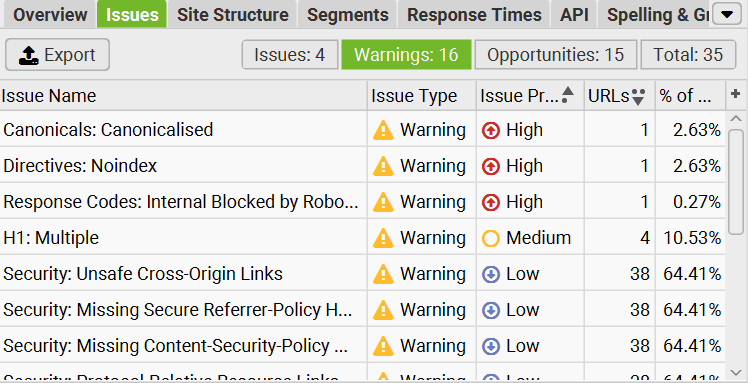
Think of the crawl as an overview that shows your site’s overall health.
The Google Search Console Check
While Screaming Frog gives you an overview and recommendations of how to fix issues, Google Search Console lets you assess your website’s real-world performance.
Use Google Search Console to check for:
Performance: Average rankings, impressions, and website clicks.
Indexing Issues: View which pages are indexed in the search results and which aren’t. Google will also tell you why certain pages aren’t indexed.
Manual Actions: If you break Google’s usage guidelines, you may be issued a penalty. Penalties can prevent your website from ranking.
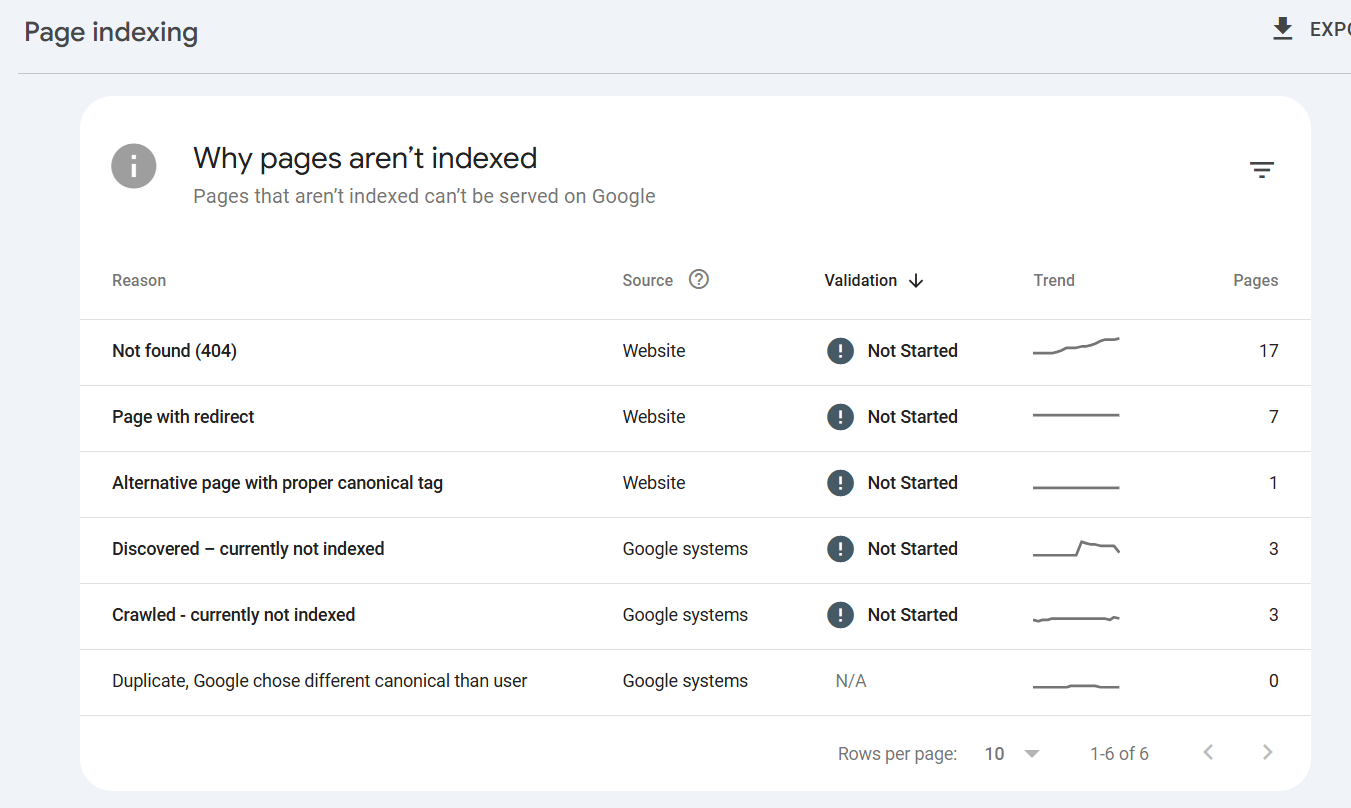
A Quick Note on Indexing Issues
Not every page on your website should be indexed. For example, if you’ve set up redirects (where an old URL directs to a new one), the old page shouldn’t be indexed. Check why pages aren’t indexed, then decide on your next steps.
In some cases, you may need to manually submit the page for indexing and update your site map.
Step 2: The Technical SEO Audit
The technical SEO audit is where many people struggle. If you’re scratching your head at this point, you’re not alone!
Think of technical SEO as the “under the hood” stuff. Users can’t see it, you might not be aware of its importance, but even tiny issues can limit your site’s ability to rank.
There are multiple technical areas to check, including:
Site Speed
Measures how quickly your website loads. Slow websites are frustrating for users and often lead to high bounce rates. If your website's loading time is over 2.5 seconds, it’s time to look at what’s causing the lag.
Optimising your images, reducing heavy scripts, and using browser caching can all increase your site’s speed.
Mobile Friendliness
More people today than ever before use mobile devices, such as smartphones and tablets, to search for information and buy products. Your website might look great on a desktop - but does it offer the same experience across all devices?
Google takes mobile friendliness seriously. It’s actually a core ranking factor. Check whether your site loads seamlessly across all devices, and make changes if it doesn’t.
HTTPS
Websites with a valid SSL certificate load over HTTPS. But if your website isn’t secure, search engines will flag it. This means users will see a security warning when they access your site, which undermines trust and impacts your traffic.
XML Sitemap & Robots.txt
Your XML sitemap is essentially a roadmap for search engine crawlers. It tells them which website pages you have and ensures that they can crawl, index, and rank them. Healthy sitemaps should be updated automatically and submitted to Google Search Console.
The robots.txt file tells crawlers which pages they should visit. One of the most common reasons a website isn't ranking is slight misconfigurations that tell crawlers not to access a specific web page.
Internal Linking
Internal linking helps users navigate your website with ease. It also keeps them on your website longer.
Broken internal links or failing to link relevant pages can impact user experience, leading to bounce rates.
Canonical Tags
Canonical tags prevent duplicate content by telling search engines which URL is the “master”. For example, if multiple URLs contain the same information and search engines crawl each of them, it can result in duplicate content.
Adding canonical tags ensures that search engine crawlers know which page to crawl, index, and rank.
Google PageSpeed Insights and Core Web Vitals
While Google Search Console can help you assess HTTPS, indexing, and link profiles, the PageSpeed Insights tool gives you a comprehensive overview of your Core Web Vitals.
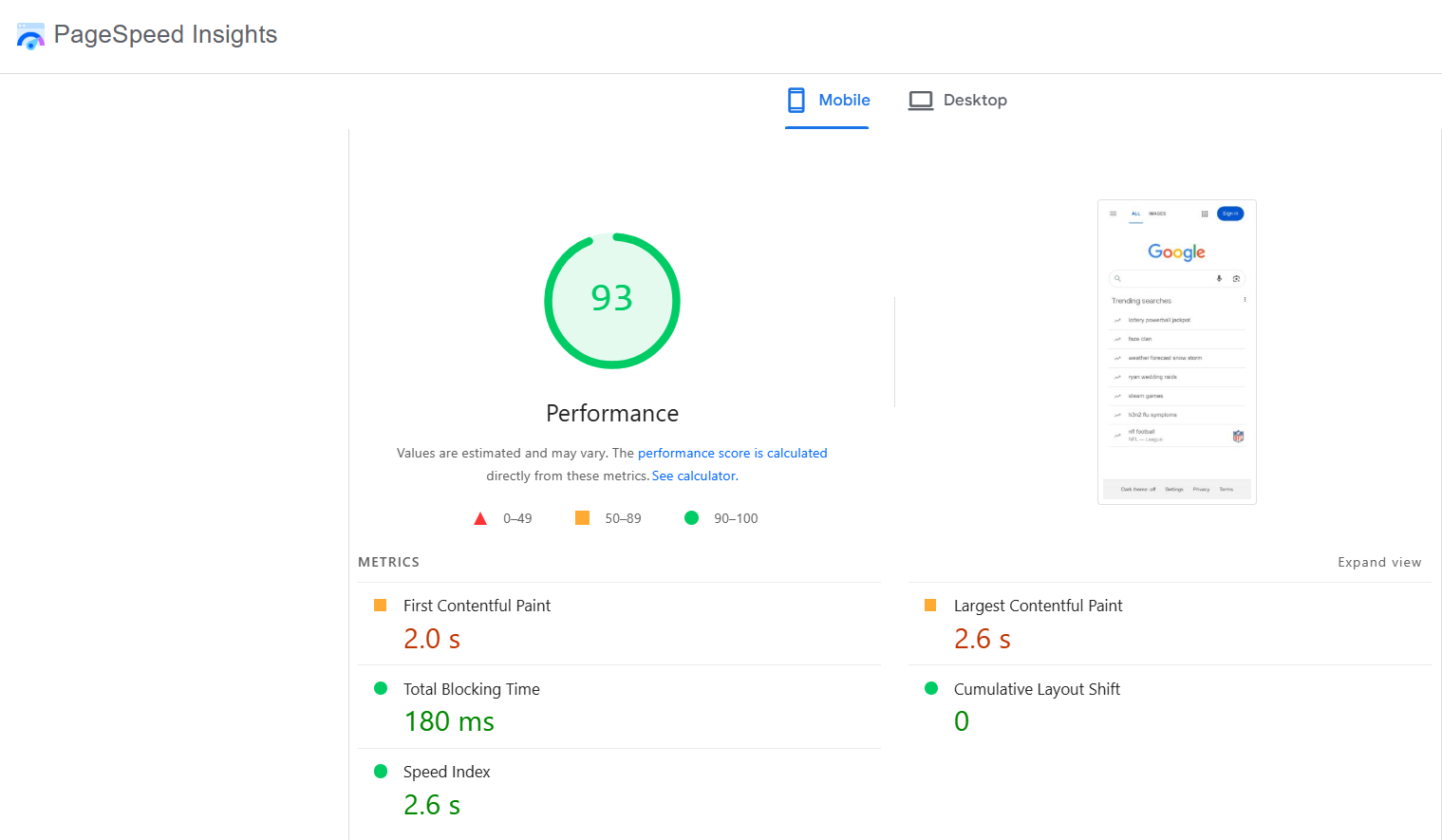
If Google struggles here, everything else becomes harder.
Step 3: The Website Content Audit
Website content audits require an open mind. You’ve spent ages writing a blog post or creating website copy, and you’re proud of what you’ve made.
Believe me, I get that. BUT, every single piece of content you create should offer value to readers and align with search intent.
A content audit is your opportunity to discover:
How your content is performing
Whether it’s generating conversions
Keyword gaps
Overlaps and duplication
Thin or outdated content
Key Areas to Focus On:
Search Intent: Do your keywords align with search intent? For example, if someone searches for Average Tenerife Temperatures in December, they’re looking for information. Your content should answer the question, not sell them a holiday to Tenerife.
Outdated Content: If you have guides for 2025, it’s time to update them for 2026. This also applies to statistics, trends, and other content. Remember, if you create evergreen content, it’s essential to review and update it regularly.
Keyword Gaps: Content audits reveal valuable content opportunities you might be missing. It could mean reoptimising a current piece of content, or creating new content to rank for a high-volume keyword.
Zero Traffic Pages: Sometimes a page has no traffic because it’s not ranking high enough. Other times, it could be because nobody is searching for your chosen keyword or query.
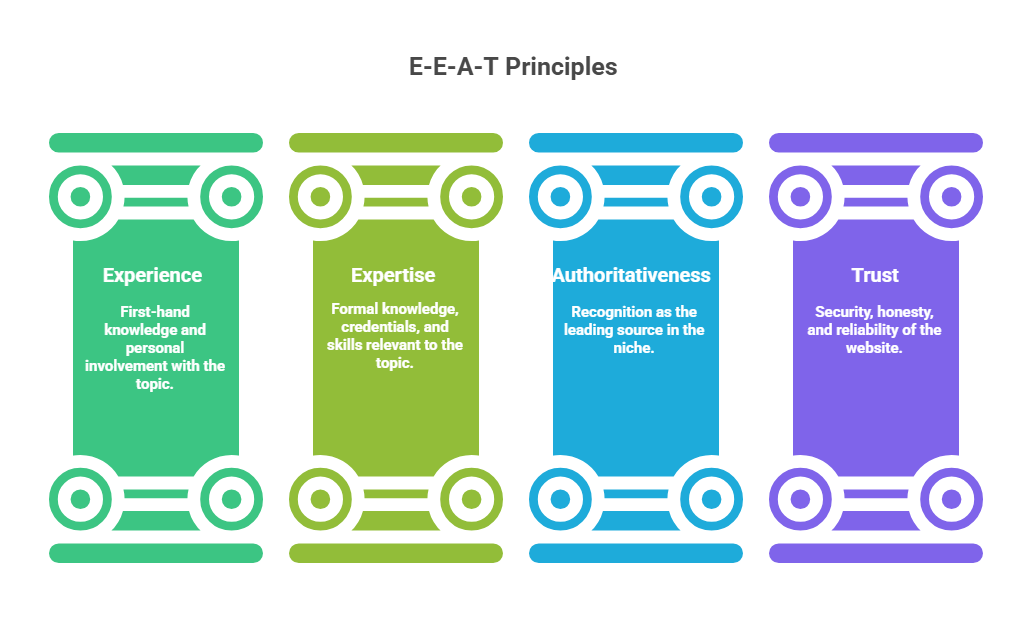
E-E-A-T Signals: Google uses E-E-A-T signals to decide whether your content offers value to readers.
Make Decisions That Matter
When it comes to choosing which content to update, keep, or remove, be ruthless. Think about your audience and focus on the content that offers the most value.
Remember, many people think that content pruning is overrated - but it’s one of the most effective ways to increase website traffic and turn casual visitors into customers.
A Tip for Small Businesses:
As a small business, one of your key abilities is speaking directly to your audience on a personal level. While large brands often focus on the big sell, your content can instil trust in your target audience.
Don’t be afraid to create content that connects with an audience on a personal level - even if it’s not got a huge search volume.
Step 4: The On-Page Audit
Every page you create should clearly communicate its purpose - for both search engines and audiences. On-page SEO is what your audience can see. You’ll need to check:
Title tags
Meta descriptions
Header structure (H1–H3)
URL structure
Title Tags and Meta Descriptions
Your title tag and meta descriptions are what audiences see when they perform a Google search.
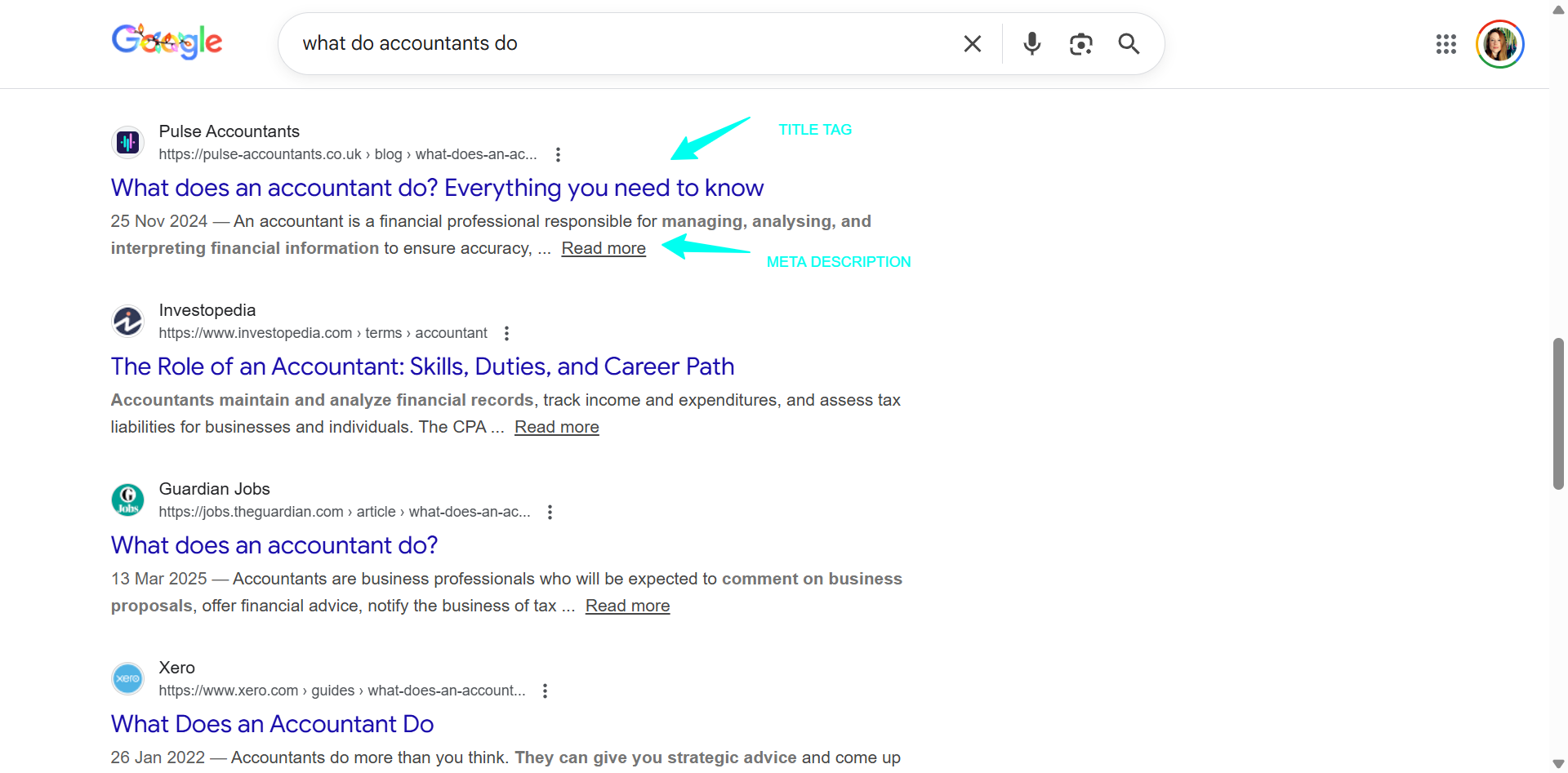
They also define whether someone clicks on your content. While including your main keyword is important, you should write descriptions that encourage clicks rather than keyword-stuffing.
Each title tag shouldn’t exceed 60 characters, while meta descriptions should have a maximum of 155 characters maximum.
Use a free tool like WebYurt to check the length of the meta title and description.
Header Structure
Heading structure organises your content logically and breaks it into digestible chunks. However, it also helps search engines understand what your content is about and is vital for SEO.
Each page should have one H1, then H2s for each section. If you want to expand on a section, use H3s. H4, H5, and H6 headings should follow the same pattern. They’re not necessary, but can break sub-sections into further points.
URL Structure
URL structure lets search engines understand what a page is about and support website hierarchy. For example, if you sell products, each URL should clearly list the product.
So instead of: website.com/product-1, your URL would be website.com/womens-trainers.
Step 5: Authority and Backlink Analysis
Even experienced SEOs will tell you that backlinks are one of the most complex parts of SEO. Unfortunately, they still hold a lot of weight and play a central role in how high your website ranks.
Even if you have fantastic content and flawless scores when you check page SEO, poor-quality or a lack of backlinks halt your website’s progress.
Backlink analysis tools let you view your links, assess their quality, spot spammy links, and identify lost links.
For example, Google Search Console provides a breakdown of your links, while competitive analysis tools help you identify linking opportunities.
Finding Link Gaps
While paid tools like Ahrefs and SEMRush provide the most in-depth backlink research, free solutions like SEO Review Tools let you enter a competitor’s domain and find out which backlinks they have.
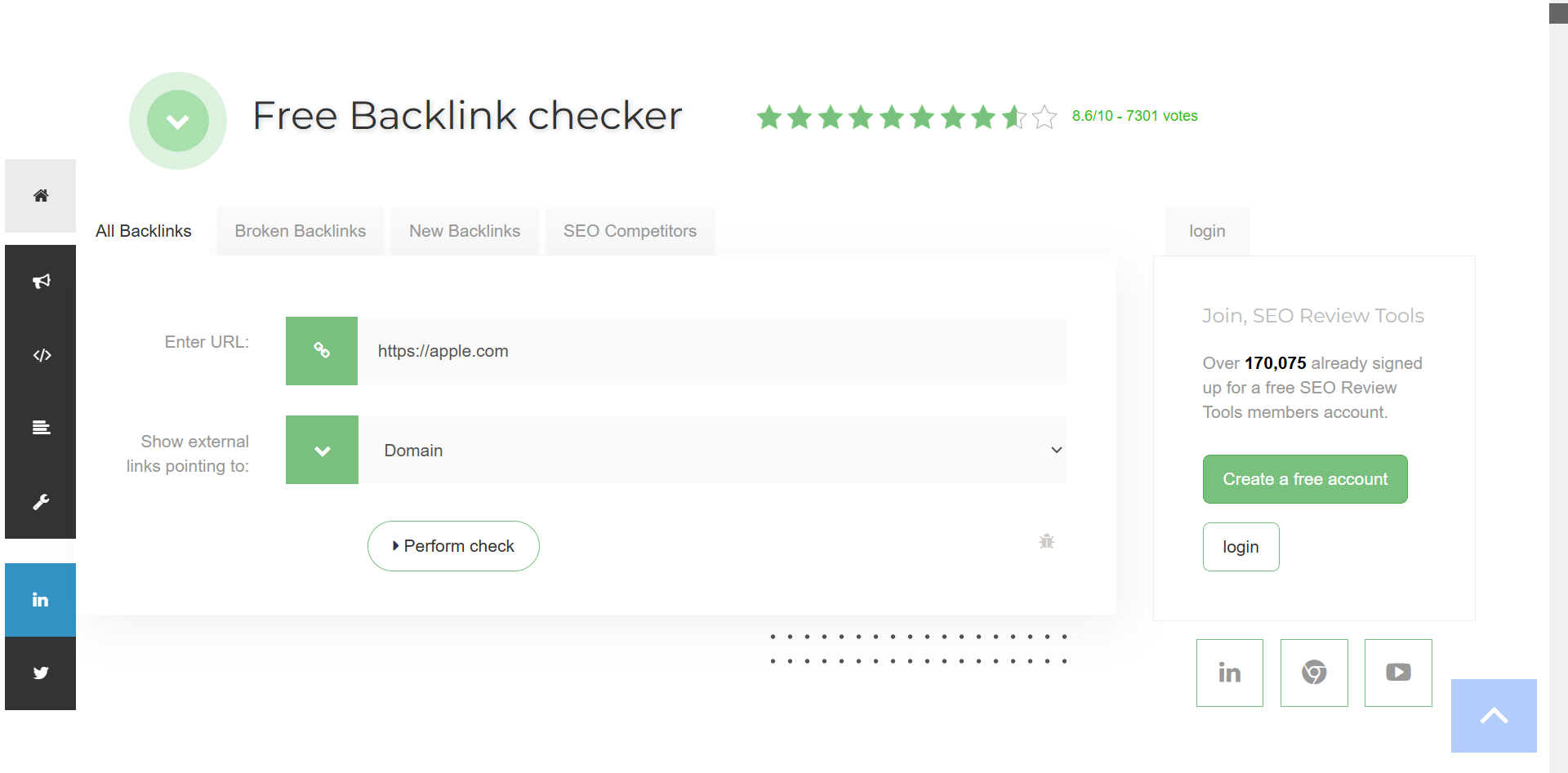
Once you have this information, you can look for gaps and create content that attracts links.
Top Tip:
Finding backlinks as a small business is hard. But websites like Featured and Qwoted let you share your knowledge in return for a link. These platforms offer free plans or paid options that allow you to submit more answers.
Step 6: Evaluating UX and Conversion
SEO attracts traffic; UX (user experience) turns that traffic into revenue.
Even if you rank first for every keyword, your visitors won’t convert if your website offers a poor experience.
Bounce rates occur when users don’t find the information they want, the website doesn’t load quickly, or if there’s no clear navigation.
Auditing four vital UX areas can help you retain website visitors and increase your conversions.
Website Navigation
How frustrated do you get when your sat nav sends you down a one-way street? It’s exactly the same for your website visitors. They should know exactly where to go and have a clear path within three seconds of clicking on your website.
Assess your website navigation and ensure it’s clear. If not, it’s time to make some changes. These could be improving your internal linking structure, changing headings to ensure they’re clear, or adding breadcrumbs.

CTA Placement
Website visitors shouldn’t have to guess which action they should take. Clear CTAs ensure a smooth journey. It’s also important to think about visibility.
Make sure your CTA buttons are visible by using contrasting colours and place your primary button above the fold (where your visitors can see it without scrolling).
Form Friction
Adding multiple fields to a form might seem like a good idea, but every field you add increases friction. Nobody wants to fill in a mountain of information, so make sure your forms are simple to enhance conversions.
Test the forms to ensure they work across all devices.
Accessibility
Nobody wants to read walls of text. It’s confusing and makes your visitors want to click away immediately. Break up your content with headings and visuals, and make use of white space.
It’s also important to consider accessibility needs. For example, text that’s too small to read or the use of similar colours can confuse your visitors. The standard font size is 16px.
Step 7: Prioritise Fixes
Once the audit is complete, you’ll know what’s going on with your website and can begin to prioritise fixes. Instead of winging it, I find it best to use Google Sheets or Notion to group your issues and prioritise them by importance.
Not all issues require fixing immediately, and it’s incredibly rare for a website to come back with absolutely nothing wrong. So, think about which fixes are limiting your performance, and focus on those first.
Top Free Website Audit Tools
There are many website audit tools available, but premium tools require a significant investment. Using a free SEO audit tool is fine for small and growing businesses, but if you have more advanced needs, upgrading in the future might be best.
My go-to free website audit tools include:
The Crawlers and Technical SEO Tools
Google Search Console: Assesses how your website performs, highlights indexing issues, and lets you know if you’ve been issued a penalty or have security issues.
Google PageSpeed Insights: Offers a performance score and evaluates how your website measures up against Core Web Vitals.
Bing Webmaster: Google often takes the spotlight, but Bing is an excellent way for small businesses to gain organic traction. Bing Webmaster’s Site Scan assesses technical SEO issues and identifies site errors.
Screaming Frog: The gold standard for in-depth technical SEO audits.
All-in-One SEO Checkers
Foresight: A free AI audit tool for B2B websites. It’s ideal for non-technical website owners, as it explains why you need to fix specific issues.
SEOptimer: Offers quick website audits that cover social visibility, on-page SEO, and usability.
SEMRush Free Checker: SEMRush is one of the most popular all-in-one tools available, but it’s expensive. The free check can provide quick insights.
UX & Accessibility
There aren’t many free UX and accessibility checkers, but WAVE is a great choice. It performs contrast checks and tells you which images don’t have alt text.
The Bottom Line
As you can see, website audits form a vital part of your online strategy. By conducting regular audits and implementing vital improvements, you’re fuelling your site's long-term growth and success.
Once you have your results, focus on the most critical issues first and then work your way down the list. And, don’t be afraid to ask for help.
For example, if your content performance is poor, getting a professional content strategy can help you stay on track and ensure you’re delivering value to your audience.
Free Website Audit Checklist
Ready to run your first website audit without the guesswork? Get the free website audit checklist and follow each step with confidence. It’s free to download and use, and you can unsubscribe at any time.
FAQs
What’s included in a technical SEO audit?
A technical SEO audit includes site structure, security, crawlability and mobile-friendly tests. It pinpoints key Core Web Vitals that could be holding you back, and checks behind-the-scenes elements that define your website’s ability to rank.
What are some common website audit mistakes to avoid?
The most common website audit mistakes include:
Ignoring mobile performance
Fixing content before technical issues
Leaving crawl errors unresolved
Forgetting internal links
Never updating old content
An audit only works if action follows.
Is a paid site audit worth the investment?
It can be, but free website audits also give you recommendations. Paid audits are best for larger websites, while free audits give you the opportunity to assess where to invest your marketing budget.
For example, you might decide that you can fix minor on-page issues alone, but need help with your copywriting. Or, perhaps you’d rather invest in a done-with-you marketing strategy that gives you a clear blueprint for higher rankings.
